BMW E36 Blog

Unlock the check button functionality for BMW E36 On Board Computer (OBC)

29th October 2007

Unlock the check button functionality for BMW E36 On Board Computer (OBC)

posted in Technical Info, Tips & Tricks |


post rating
PoorOkayGoodGreatExcellent (3 votes, average: 5 out of 5)
Loading ... Loading ...
 Would you like to upgrade your car lighting to HID (Xenon)? Read here about how you can do this fast and cheap. This is one of the best upgrades that I recommend for any BMW E36 owner. It will give your car enhanced lighting and a cool look at the same time.


Hi Guys, One of the issues that were annoying me about my car is the OBC (On Board Computer) check button. Whenever I press that button, I was receiving this row of orange squares that I didn’t know what they meant. After a while, I thought this meant the car was ok and that there’s nothing wrong to report until today when I found an article that’s talking about this exact problem and how to unlock the check functionality. It turned out that the row of orange boxes (which looks like a full battery) meant that the check functionality is disabled in the car and that you have to enable it simply by following some easy steps.

Disclaimer: Use this info at your own risk!! I’m not responsible if this didn’t work for you :-).


To unlock your car’s check button functionality:

1. Hold down 1000 and 10 to get access to the hidden menus. [TEST --]

Note: please notice that this may not work if you didn’t unlock the hidden menus in your OBC using TEST 19. If you don’t know how to do this, please refer to my previous post BMW On Board Computer (OBD) secrets!.

2. Enter 11, and press Set/Reset. You will notice this on the OBC screen [EINHEIT 1: xx] (xx will be a number)
3. Change this EINHEIT 1 value to 71, using the 10 and 1 buttons, then press Set/Reset.
4. Press the 1000 button once to move to the next value which is [EINHEIT 2 xx] (xx will be a number)
5. Change this EINHEIT 2 value to FF, using the 10 and 1 buttons, then press Set/Reset.

Note: I’ve found that this value was already set correctly on my OBC.

6. After that, just press your "check" button.

I’ve tried this on my car and I have to admit it didn’t work completely as expected. Now, I receive this "Check Control Inactive" error which apparently trying to tell me that I’m one step short from making this work on my car.
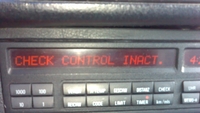
Video of my car OBC after unlocking check functionality

So, if anyone can help with this, please let me know.

If your car is:
325i 1994 or 318is 1993: Set EINHEIT 1 value to 71
320i 1994: Set EINHEIT 1 value to 7B
328i 1995: Set EINHEIT 1 value to BA
M3 1997,1998: Set EINHEIT 1 value to B3

BMW E36 Blog: The ultimate BMW E36 information source.


If your BMW and other custom cars need custom wheels, check us out today. We also have information about custom motorcycles that you might like too!

Want to receive exciting tips & information about BMW E36 cars? Enter your Email:-



Having A Problem With Your Bimmer?

Use JustAnswer Service to get help from a BMW expert now! You can also read my review of this service here.

There are currently 42 responses to “Unlock the check button functionality for BMW E36 On Board Computer (OBC)”

Why not let us know what you think by adding your own comment! Your opinion is as valid as anyone elses, so come on... let us know what you think.

  1. 1 On February 3rd, 2008, Steve said:

    Hi, any answers to your questions ? I have the same problem after changing to the 18 button on my 93 325i. If I put the old OBC back on the Check control works so its in the OBC and your on the right track. I will try your instructions tomorow. Thanks

  2. 2 On February 3rd, 2008, Tony Sticks said:

    I’m sorry Steve, I couldn’t find any information regarding this problem and my car is still showing this message. If you found any solution, please let us know.

  3. 3 On February 4th, 2008, Tony Sticks said:

    Steve,

    About your old OBC which works for the “check” button, can’t you check it to see what are the codes used for EINHEIT 1 and EINHEIT 2 ?

  4. 4 On February 5th, 2008, Steve said:

    Tony, Good news for me anyway & I hope that it works for you ! I borrowed a unit from a friends E36 95 328i convertable with a fully working OBC put it in mine and it worked. The EINHEIT 1 was 01 and EINHEIT 2 FF. Fitted my OBC entered the same numbers and it said Check Control Inactive. Turned ignition off and back on and it works ! Mine is a 93 E36 325i I think I must have accidently changed the values whilst being a little too excited to check all the functions after following the instructions to retro fit the unit. I think it was your instructions ? They were great anyway. I hope this works for you. Regards, Steve

  5. 5 On February 5th, 2008, Tony Sticks said:

    Congrats Steve! I will try it on my car today. I hope it works. Thank you anyway for reporting this.

  6. 6 On February 9th, 2008, Steve said:

    Tony, Any luck with your OBC with EINHEIT 1 @ 01 ?

  7. 7 On February 10th, 2008, Tony Sticks said:

    Hi Steve,

    I’ve tried it on my car, but it didn’t work. I even tried many other number combinations and still didn’t work. What I’ve figured out is that it seems that the EINHEIT 1 & 2 are actually a group of bits that set flags True/False. If you have any idea about hexadecimal numbers (16-base) then take a look at this:

    (In Hex) FF ==> (In bits) 1111 1111

    The first flag (right-most) is actually setting the clock mode to be either 24-hours/12-hours. For example if you set EINHEIT 1 to 79, the flag will be set and the clock will be in 12-hour mode. 78 and the flag is clear, so the clock will be in 24-hour mode. 77 will set the first flag again and the clock will be in 12-hour mode.

    The problem is that there are 16 flags and I figured the first one only. I’m sure this should be documented somewhere, I just can’t find it.

    My theory now is that the check control is enabled through two flags, not one. So, I just need to determine the 2 flags that control the check unit and I believe it should work. It needs however sometime to check and try to determine those flags.

  8. 8 On February 10th, 2008, Steve said:

    Tony, Dont know if it makes a difference but the country code on both the units I have working is 8 Aus/Glf as in Australia. What year and model is yours ? I will keep my eye out for one in a car yard and have a look. Good luck, Steve

  9. 9 On February 11th, 2008, Tony Sticks said:

    Thanks Steve, I really appreciate it. My car is 318is 1993. I found some information in the forums saying that the 318is doesn’t have check-control. I didn’t buy it though.

  10. 10 On February 12th, 2008, Jaime Quiel said:

    Tony, Hi again, I almost have 1 year with my 328i 97, and from the begining I have been trying to solve an check engine message. The engine is working fine, I guess so. I had check with the computer, and we got next code: 254 Massive Leak of Gas (Is the translation of the check engine error code, because is in spanish”FUGA MASIVA DE COMBUSTIBLE”) I had find out with some Mechanical about this error, but nothing. I change the fuel pump, we check tha gas collector, behind the rear right wheel, I had clear the check engine several times but it comes again after 2 or 3 days, maybe you or somebody out there could help me with that, I appraciate it a lot… Thanks for you time, Bye
    Jaime

  11. 11 On May 20th, 2008, Kristian said:

    Hi. I’m also having this problem with my 99 E36 Touring. It came with the 18 btn but somehow the check controll has been deactivated (has been done before I got it). I also get the orange squares. So I tried to follow your DIY to fix it. I have the same problem as you - i get the “check control inactive” message. I fiddled with different values for Einheit 1 (whitch means “unit 1″ in german). I discovered that values ending in 4 and 6 + C and E all game me the orange squares. The other numbers gave me the inactive message. I also discovered that values ending on pairs (0,2,4,6,8,A,C,E) gave me 24-hour clock and metric system (whitch is what i want). The others gave me 12-hour clock and US-system. So I tried all the combos of “pairs” without luck. All of them gave me either orange squares og the error message. I did not try to fiddle with einheit 2 though.

  12. 12 On May 21st, 2008, Tony Sticks said:

    @Kristian: Is it a 318i ?

  13. 13 On May 21st, 2008, Kristian said:

    No, it’s a 320 automatic.

  14. 14 On May 21st, 2008, Tony Sticks said:

    @Kristian: I thought this is a problem with 318is cars only. Now, I’m not sure.

  15. 15 On May 22nd, 2008, Kristian said:

    I have a hunch that someone before me has deactivated the check control. I dunno why, and I’d like to get it back.

  16. 16 On May 22nd, 2008, Tony Sticks said:

    @Kristian: Try to set EINHEIT 1 value to 4 while EINHEIT 2 is FF? Does it work?

  17. 17 On May 22nd, 2008, Kristian said:

    That was actually the value it was set to when I lokked at it the first time (04/FF). So, no it does not work :-( I’ve tried all values for EINHEIT 1 ending in pairs - none works for me. Haven’t done anything with EINHEIT 2 though.

  18. 18 On June 3rd, 2008, ukfrog said:

    Hi all,
    I’ve been having the same problem.
    To get the check control working you need to change the value in the diagnosis test activation code 15.
    My car is a 325i 1993 auto M50 and in order to activate my replacement 18 button OBC, I had to change the value in diag to 01 05 000 E2.
    My EINHEIT 1 setting is 73 for 24h clock, and EINHEIT 2 is FF.

    I’m really not sure about code 16, PORT with its 9 settings, and code 17, PROM that has 8 settings.

    Hope this can help someone with similar car.

  19. 19 On June 3rd, 2008, ukfrog said:

    As it comes, if anybody can please enlighten me on the 15, 16 and 17 codes functions, that would be brilliant!

  20. 20 On June 4th, 2008, Tony Sticks said:

    @ukfrog: Hi and welcome to the BMW E36 Blog. I’ve checked this in my OBC and I couldn’t change the value of the DIAG (code 15). It seems that this is a list of 6 numbers that you can move between them using the 1000, 100 buttons. But how did you change these values? Also, how did you guess the correct numbers for your car?

  21. 21 On June 4th, 2008, ukfrog said:

    Hi Tony, thanks for welcome.

    I don’t think you can change the settings on 15, 16, 17. My understanding of it, is that you must select one of the settings, and following what setting you have inputted, you will get different type of diag running. That’s for code 15.

    About my settings, well I had to find out the hard way, a couple of days on the net reading blogs and forums. I finally found someone with a 325i and just copied his settings for code 15, 16, 17, the remaining codes worked.

    For code 15.
    My settings are 01 05 000 E2 this opened up the check control on my OBC. (I think only for E36 325i)
    Now if I was to change this to the next setting by pressing 100 or 1000 then I wouldn’t get the check control but something else, or the check control and something else. Do you see what I mean?

    Also, I know that you guys have a problem reading the codes 4 to 15 on the instruments display test codes. I think the secret is, again, locked in code 15 of the OBC, you just have to find out the right code to activate this test…
    Now I could be wrong all the way, but the code 15 was the one that made the engine check control work on my OBC in the first place. My guess is, it must be related somehow.
    Concerning test code 13: ANK:
    This is your ITA, in order to get this working, you need to input a distance in your OBC using the distance button then it will calculate your ITA accordingly. Must have 18 buttons OBC.

    This bit of kit is full of useful things, if only BMW had a manual for it!!! LOL

  22. 22 On June 6th, 2008, Tony Sticks said:

    @ukfrog: LOL! Alright, thanks for the explanation but I have 2 questions:

    1. I have tried to switch between the 6 differnet values for code 15 and after moving lets say to number 2, I hit “set” button. Nothing happpened ok? then I moved my OBC to another thing (external temp for example), then went back to the code 15 screen to find that nothing has changed and that my OBC is pointing to number 1 again.

    With that being said, I think you’re right that the value in code 15 may somehow determine if the Check feature is going to work or not, but the total values in the code 15 will determine that (I mean the 6 values together). So, I think if you’re to do this, you will need to somehow edit the 6 values and store the changes.

    2. Can you try to switch from value 1 in code 15 to value 2? I think it won’t change anything

    Again, my understanding of the code 15 is that there are 6 numbers which are stored in the OBC and will determine if the diagnosis feature is active or not. The question is “Can you change these values?”

  23. 23 On June 6th, 2008, ukfrog said:

    I also had a play with it, and had the same result.
    It seems the values are fixed and regardless of what you input, the end result is the same.
    Maybe you just need to pair the OBC to the car when post fitted or swapped for bad pix like I did.

    Or, The EINHEIT has something to do with it also!

    The only data that you can access to change is in the EINHEIT test code 11. And this seems to have an influence on the OCB regarding TIME, and date formats. But to go through all of it will be very time consuming.
    I’ll change mine one by one, and keep you updated with results if any! looks like there is over 70 comb.LOL

  24. 24 On June 8th, 2008, ukfrog said:

    Ok, I had this all wrong I did.
    I had a good look at it today, and I am now sure that the EINHEIT 2 is part of the diag test settings.
    For my 325i my EINHEIT is set on FF
    If I use other settings, my OBC Check control is INACT.
    So this means that for all of you with that problem need to find out what the setting is for your EINHEIT

    Mine are for my E36 1993 325i auto:
    EINHEIT 1 73
    EINHEIT 2 FF

    Hope this helps.

    If some of you can post your EINHEIT 1 and 2 settings and the year and model of your car, it could be of great help to someone seeking to resolve their OBC problem.

    Thanks all.

    An other mile, an other smile.

  25. 25 On June 8th, 2008, Tony Sticks said:

    @ukfrog: My guess is that the Einheit 2 is actually a set of 8 binary bits (if you know a little bit about programming). FF is a hexadecimal value which represents:

    1 1 1 1 1 1 1 1
    —————————–
    128 64 32 16 8 4 2 1

    The value FF means that all the bits are set. That’s why FF turned your check engine on. So, my guess is one of the following values will turn the check engine on while the rest will not. Can you please verify that one and only one of these values will turn the check button on?

    The values are:
    01
    02
    04
    08
    10
    20
    40
    80

    Just use each value of these and see if it turns the check feature on. This should show what is the specific bit that is responsible to turn this feature on.

    Now, I believe that this whole feature is “somehow” not supported in my car and that’s why it’s not turning on. My guess is that this feature is optional and it won’t work in all the 18-button OBC’s unless the car had this feature originally. Anyone can contradict this theory?

  26. 26 On June 8th, 2008, ukfrog said:

    Ok, I’ll have a go in the morning.

    So you want to try and change the EINHEIT 2 value to what you have above? Am I correct?
    I’ll print it out and try it on my way tomorrow.
    TBC…

  27. 27 On June 8th, 2008, ukfrog said:

    Also have a look here.

    http://www.ideaphile.com/bmw/540-obc.html

    It’s for OBC on E39, but still similar to the E36 model.

  28. 28 On June 9th, 2008, Tony Sticks said:

    @ukfrog: Yes, this is exactly what I mean. Thanks in advance :-)

  29. 29 On June 9th, 2008, Tony Sticks said:

    @ukfrog: We do have the same content for the BMW E36 here. I call it BMW On Board Computer (OBC) secrets!. Check it out :D !

  30. 30 On June 9th, 2008, ukfrog said:

    Smart pants Tony!

    All values stated on your post worked, and turned the check control on. In addition I tried a few others that did too.
    Now, you are going to have to explain this to me in good, old, plain, English my friend.
    I’m afraid that I’m no programmer! How do you get from 1 1 1 1 1 1 1 1 to 128 64 32 8 4 2 1?
    And if this means that all values are set, wouldn’t be logical then for the port to read 1 1 1 1 1 1 1 1 1 all over rather than 1 0 1 …. What ever mine are!? Or would it read this on the port because it doesn’t have full spec (i.e. Air Con. heated seats, etc.)
    Would this define the 0 rather than 1 in the field corresponding to that accessory?

    One thing that surprises me, is that my e36 is not top of the range; it has no Air Con, no heated seats, no air bags, no ashtray! But still the OBC is unlocked, and I get the full test available on it.
    So, my “other” question is; why does yours not work?

    P.S.

    Regarding the link, no disrespect intended towards this forum of cause, but I just found a lot of complementary information in that post and thought this would be a good contribution to our research. Wink, Wink.

  31. 31 On June 9th, 2008, Steve said:

    G’day again, My EINHEIT 1 was 01 and EINHEIT 2 FF for my 1993 325i to work. It may or may not be related but why recently used the Peake Test unit I could not get any diagnostics, only the FF on the test unit. So I am thinking that there may be various successful combinations that make the check control display work but wondering if anyone has checked the diagnostic functions from the round 20 pin connector under the bonnet ? Any thoughts ? Regards, Steve

  32. 32 On June 10th, 2008, Tony Sticks said:

    @ukfrog: Unfortunately, I was expecting only one of the values that I gave you to work.

    My theory was that the Einheit is a bunch of flags and to enable the check feature, you only needed to set one flag to 1. The other flags don’t matter. But since you’re saying that all my values worked correctly, it means that my theory is wrong.

    About how to get these numbers out of the 1’s, it’s simple:-

    The first 1 value has index 0 (starting from the right) => 2^0 ==> 1
    The second 1 value has index 1 (starting from the right) => 2^1 ==> 2
    The third 1 value has index 2 (starting from the right) => 2^2 ==> 4
    The fourth 1 value has index 3 (starting from the right) => 2^3 ==> 8
    .
    .
    .
    etc…

    It’s really weird why I’m unable to get this to work. One note though is that I’ve never talked to anyone who has 318is and has the check control active. Maybe this is the reason… I don’t know.

    About the link, don’t worry about it. It’s no problem at all :-) I just thought I should point you to the E36 version of that article… that’s all.

  33. 33 On June 10th, 2008, Tony Sticks said:

    @Steve: You mean that you can use the “check” feature, but the Peak unit doesn’t work?

  34. 34 On June 10th, 2008, ukfrog said:

    @Tony
    Thanks, I get it now.
    Why did you expect only one of the values to work?
    Was your theory based on only one value only corresponding to the Check control, and the others attributed to other diags like; one to the lambda sensor, one to the outside Temp, one to the ICV, one to the TPS, etc etc?
    Tell me what you think of this? (my theory…No.186985)
    If your car is say a 320, you have different settings on the EINHEIT, and the same applies to the 325, and the 328, etc. All have a different ECU’s.

    The ECU is set for a particular type of diag test following the model of car. And because all don’t have the same sensors and relays and gismo, the OBC would have to be “paired” with the ECU?!
    Does this make any sense?
    This could be the reason why your OBC doesn’t show the check control test, it’s simply not programmed in the ECU. Only the general 20 pin engine socket will supply diagtest result!

    It bugs me to have something, and not know how to use it!!! I find it frustrating. It’s like having something new, with a button on it, and you don’t know what the button does! LOL

  35. 35 On June 10th, 2008, ukfrog said:

    @steve

    I would love to have one of those big mother of computer they have at BMW’s, but do you know how must they are? LOL
    Or are you talking about having it done in garage, and run a diag test from there?

  36. 36 On June 10th, 2008, Steve said:

    Tony & ukfrog,
    This all sounds like the start of a joke…There was an American Englishman and an Australian trying to sort this BMW problem ..

    Since changing to the 18 Button OBC with EINHEIT 1 now set 01 and EINHEIT 2 FF the “check” feature works but the Peak unit doesn’t work. With the 8 button connected or the X1071 white connector removed, same thing effectively, the Peake diagnostics work. So I have made a blunder downunder, somewhere.
    The interesting thing is that ukfrog and I have the same model but different settings to make the display work. The diagnostic Bus is quite brillant in its K and L bus etc.
    I am also trying to find time to see my old Tech College teacher who now works for a BMW dealer 3 days a week looking after the aprentices whom I am sure will let me play with the BMW toys the only problem is that these cars are now considered old and finding the old test equipment and someone with the expertise will be quite a challenge.Tony & ukfrog,
    This all sounds like the start of a joke…There was an American Englishman and an Australian trying to sort this BMW problem ..

    Since changing to the 18 Button OBC with EINHEIT 1 now set 01 and EINHEIT 2 FF the “check” feature works but the Peak unit doesn’t work. With the 8 button connected or the X1071 white connector removed, same thing effectively, the Peake diagnostics work. So I have made a blunder downunder, somewhere.
    The interesting thing is that ukfrog and I have the same model but different settings to make the display work. The diagnostic Bus is quite brilliant in its K and L bus etc.
    I am also trying to find time to see my old Tech College teacher who now works for a BMW dealer 3 days a week looking after the apprentices whom I am sure will let me play with the BMW toys the only problem is that these cars are now considered old and finding the old test equipment and someone with the expertise will be quite a challenge.
    Any thoughts Gents ?

  37. 37 On June 11th, 2008, Tony Sticks said:

    @ukfrog: Yes, but the problem is that all the combinations have been tested and they never worked. Not anyone of them. I think Kristian has tried them all. So, if all the combinations failed, then your theory No.186985 is wrong I’m afraid.

  38. 38 On June 11th, 2008, Tony Sticks said:

    @Steve: If we built on ukfrog’s theory and what you’re saying, it seems that the Einheit 1 & 2 don’t have to be the same for two cars with the same specs. does that make any sense? I would say yes. Lets assume that we’re working at BMW. I think the “check” feature is optional and so, they need a simple way to enable/disable this feature in the cars without having to remove parts. It’s possible that every car has a specific combination (maybe not only the Einheit 1 & 2). If we know what is controlling this, we would figure the solution.

  39. 39 On June 11th, 2008, ukfrog said:

    @Tony Sticks
    If and that is a big IF, every car had its own combination, BMW tech’s would go barmy. I think it’s simpler than that.
    Maybe we’re looking in the wrong direction.

    @Steve
    It would be great if you could find the time to see that old mate of yours. An insider would be of great help! SO CALL HIM! LOL G’day mate

  40. 40 On June 12th, 2008, Tony Sticks said:

    @ukfrog: Well, I’m not sure if it’s that simple anymore.

  41. 41 On July 19th, 2008, Chris said:

    Hello All,

    Is there any news on how to use the check button? in my case, i have a 318is 1997. When i press the Check button it gives me that the “Check control inactive, consult owner’s manual..” too.

    Did anyone find a solution for that? i m thinking to go to the official BMW company here at my country and ask them

    Regards guys
    Chris

  42. 42 On July 19th, 2008, Tony Sticks said:

    @Chris: Unfortunately Chris, I didn’t find a solution for this problem yet. If you find anything, please share it with us here

Leave a Reply